How to Maintain and Grow Your Business Website After Launch
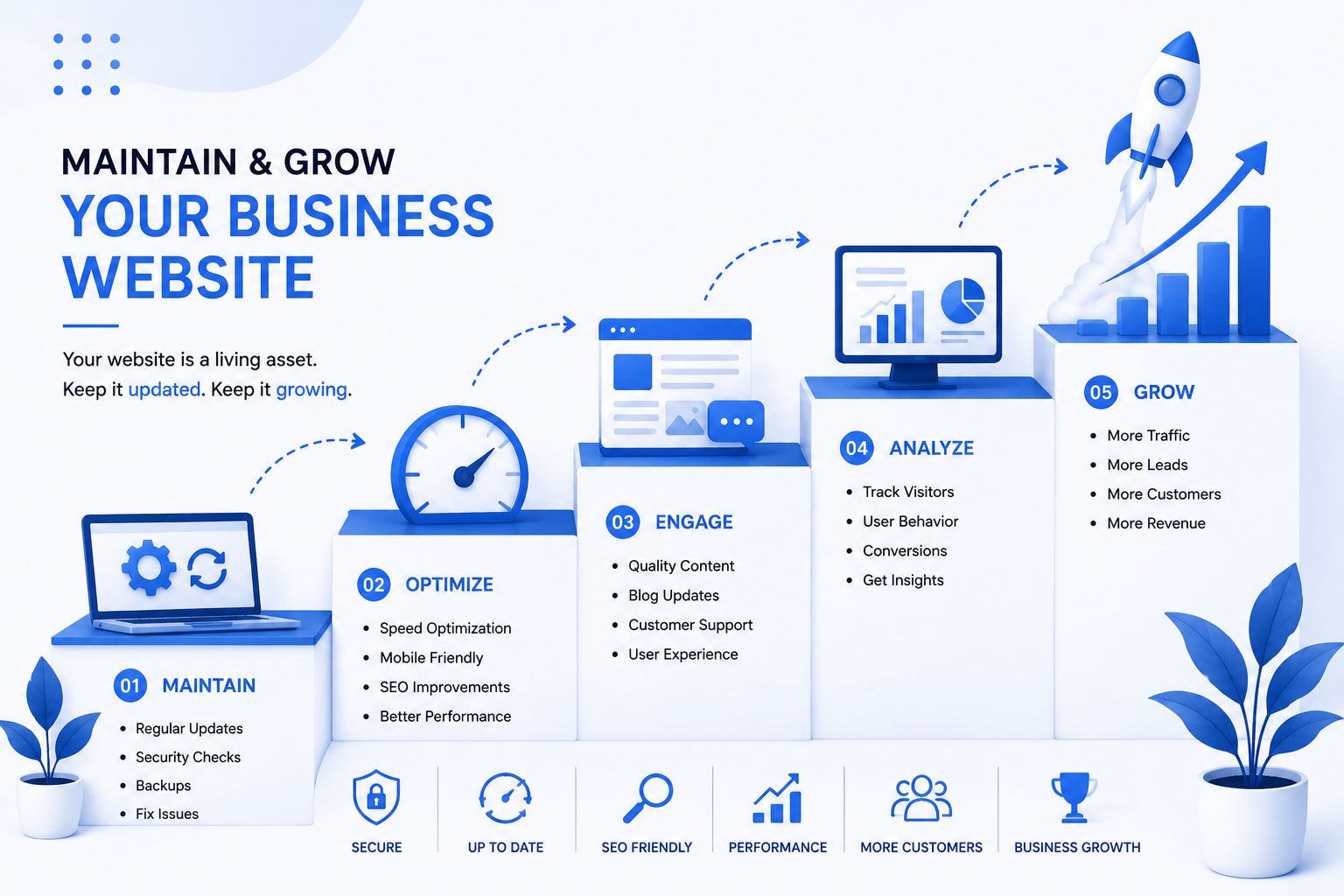
Launching your website is only the beginning. Learn how to maintain, update, secure, optimize, and grow your business website for long-term online success.
How to Maintain and Grow Your Business Website After Launch
Launching your website is only the beginning. Your work doesn't end when the website goes live.
A successful website needs regular maintenance, fresh content, security updates, performance checks, and continuous improvements.
As your business grows, your website should grow with it.
At C2D (Concept to Deploy), we believe a website should be treated as an ongoing business asset rather than something you build once and forget.
If you haven't read our previous guide, start with How SEO Helps Your Business Website Rank on Google.
Now let's look at the important steps for maintaining and growing your website after launch.
Step 1: Check Your Website Regularly
Start by checking your website regularly to make sure everything is working correctly.
Look for:
- Broken links
- Missing images
- Contact form problems
- Incorrect contact details
- Broken buttons
- Navigation issues
- Display problems on mobile devices
- Slow-loading pages
A small problem on your website can prevent a potential customer from contacting your business.
Regular checks help you identify problems before they become bigger issues.
Step 2: Keep Your Business Information Updated
Your website should always contain accurate business information.
Review important details such as:
- Phone numbers
- Email addresses
- Business hours
- Address
- Services
- Product information
- Pricing information
- Social media links
If your business changes, update your website as soon as possible.
Outdated information can create confusion and reduce customer trust.
Step 3: Keep Adding Fresh Content
Fresh and useful content can make your website more valuable to visitors.
You can add:
- Blog articles
- New services
- New products
- Customer stories
- Case studies
- FAQs
- Project updates
- Helpful guides
For example, businesses can use a blog to answer common customer questions and share useful information related to their industry.
This can also create additional opportunities to target relevant search terms.
At C2D, we recommend creating content that provides genuine value instead of publishing content simply to fill a blog page.
Step 4: Continue Your SEO Work
SEO doesn't stop after your website starts appearing in search results.
Continue reviewing your website's search performance and look for opportunities to improve your content.
You can work on:
- New keyword opportunities
- Existing page content
- Blog articles
- Internal links
- Page titles
- Meta descriptions
- Image optimization
- Local SEO
If you want to understand the SEO basics first, read our guide on How SEO Helps Your Business Website Rank on Google.
SEO is a long-term process, so consistent improvement is more useful than expecting instant results.
Step 5: Monitor Website Performance
Your website should provide a smooth experience for visitors.
Pay attention to:
- Page loading speed
- Mobile responsiveness
- Navigation
- Image loading
- Forms
- Server performance
If a page becomes slower over time, investigate the reason and optimize it.
Performance problems can make it harder for visitors to use your website comfortably.
Step 6: Keep Your Website Secure
Website security is an important part of maintenance.
Depending on your website technology, security maintenance may include:
- Keeping software updated
- Updating plugins and dependencies
- Using strong passwords
- Managing user access carefully
- Keeping SSL active
- Taking regular backups
- Monitoring for suspicious activity
Don't wait until something goes wrong before thinking about security.
A proper maintenance routine helps reduce avoidable risks.
Step 7: Back Up Your Website
A backup gives you a way to recover your website if something goes wrong.
Depending on your setup, backups may include:
- Website files
- Database
- Uploaded images
- Important configuration files
- Content
Keep backups in a secure location and make sure you know how to restore them if necessary.
Step 8: Review Your Analytics
Website analytics can help you understand how visitors interact with your website.
Look at information such as:
- Number of visitors
- Popular pages
- Traffic sources
- Search queries
- Device types
- Conversions
- Enquiries
This information can help you identify which parts of your website are performing well and which areas need improvement.
For example, if many visitors view your services page but very few contact you, you may need to improve the content or call to action on that page.
Step 9: Improve Your Website Based on Customer Behavior
Your website should evolve based on what your visitors actually need.
Ask yourself:
- Which pages receive the most attention?
- Where do visitors leave?
- Which services receive the most enquiries?
- What questions do customers repeatedly ask?
- Are visitors finding the information they need?
Use these observations to make practical improvements.
A website doesn't have to be redesigned completely every few months. Small, meaningful improvements can make a significant difference over time.
Step 10: Add New Features When Your Business Needs Them
As your business grows, your website may need additional functionality.
You might eventually add:
- Online booking
- Payment systems
- Customer accounts
- Product catalogs
- Online stores
- Enquiry forms
- Live chat
- Appointment systems
- Customer dashboards
Don't add features simply because they are popular.
Add functionality when it solves a real business or customer problem.
C2D can help businesses evaluate their requirements and plan website improvements as their needs change.
Step 11: Keep Your Portfolio Updated
If your website includes a portfolio or gallery, keep it current.
Add recent:
- Projects
- Products
- Client work
- Case studies
- Achievements
A regularly updated portfolio shows potential customers that your business is active and continues to deliver work.
Step 12: Keep Building Trust
Your website should continue to build credibility as your business grows.
Consider adding:
- New testimonials
- Customer reviews
- Case studies
- Project results
- Certifications
- Business achievements
- Frequently asked questions
Real examples and genuine customer experiences can help new visitors feel more confident about choosing your business.
Step 13: Review Your Website Content
Content that was accurate a year ago may not be accurate today.
Review your pages regularly and remove or update outdated information.
Ask:
- Is this information still correct?
- Are our services still the same?
- Are our contact details correct?
- Do our images represent our current business?
- Can this page be explained more clearly?
Keeping content current makes your website more useful to both customers and search engines.
Step 14: Keep Improving Your User Experience
A good website should be easy to use.
As your website grows, make sure it doesn't become unnecessarily complicated.
Continue improving:
- Navigation
- Page layouts
- Buttons
- Forms
- Readability
- Mobile experience
- Accessibility
Always think about the visitor's journey from the moment they enter your website to the moment they contact or purchase from your business.
How Often Should You Maintain Your Website?
There isn't one maintenance schedule that works for every website.
However, a simple routine can help:
Regular Checks
Check important pages, forms, links, and contact information.
Monthly Review
Review performance, content, security, and analytics.
Ongoing Updates
Update your services, products, portfolio, and other business information whenever something changes.
Long-Term Improvements
Review your website strategy and make improvements based on business growth and customer behavior.
Website Maintenance Checklist
- Check website pages
- Test contact forms
- Check links and buttons
- Update business information
- Update services and products
- Publish useful content
- Review SEO performance
- Optimize website speed
- Check mobile responsiveness
- Update software and dependencies
- Maintain backups
- Review website security
- Monitor analytics
- Update portfolio and testimonials
- Improve user experience
Why Website Maintenance Matters
A website that is regularly maintained can remain useful, secure, accurate, and aligned with your business goals.
Without maintenance, websites can become outdated, slow, difficult to use, or vulnerable to technical problems.
Think of your website as a digital version of your business. Just as you continuously improve your business, your website should improve too.
The Complete Website Growth Process
Creating a successful website is an ongoing journey.
The process can be viewed as:
Plan → Build → Launch → Optimize → Maintain → Grow
Each stage supports the next one.
First, you plan your website. Then you build it professionally. After launch, you optimize it for search engines and user experience. Finally, you continue maintaining and improving it as your business grows.
That's the approach we believe in at C2D (Concept to Deploy).
Build, Maintain and Grow With C2D
At C2D, we don't see website development as a one-time task.
We believe your website should grow alongside your business.
From planning and website development to SEO, content, performance improvements, and ongoing maintenance, every stage contributes to creating a stronger online presence.
If you're planning a new website or looking to improve an existing one, C2D can help turn your ideas into a practical digital solution.
Ready to build and grow your online presence?
Let's turn your concept into something that works with C2D.
What's Next?
Maintaining your website keeps it healthy, secure, and useful as your business grows. But if you're working with a development team, there's another important part of keeping your online systems reliable: deploying updates safely.
In our next guide, we'll look at a practical developer-friendly checklist for deploying updates while keeping your application available.
Previous: How SEO Helps Your Business Website Rank on Google
Next: A Developer-Friendly Checklist for Zero-Downtime Deploys