How to Plan Your Business Website Before You Build It
Planning a website before development can save time, reduce costs, and create a better user experience. Follow this step-by-step guide from C2D to plan your business website.
How to Plan Your Business Website Before You Build It
A successful website doesn't begin with coding. It begins with a clear plan.
Before a website is designed and developed, you need to understand what the website should achieve, who it is for, what pages it needs, and what information visitors should find.
At C2D (Concept to Deploy), we believe proper planning is one of the most important stages of website development. A clear plan helps create a website that is easier to build, easier to use, and better aligned with business goals.
Now, let's take the next step and plan your business website.
Step 1: Define Your Website Goal
Start with one simple question:
What is the main purpose of my website?
Your website could be designed to:
- Generate enquiries
- Get more customers
- Showcase your services
- Sell products online
- Receive bookings
- Showcase your portfolio
- Build brand credibility
- Provide information to customers
Try to identify one primary goal for your website.
For example, a photographer may want to showcase their work and receive enquiries, while a local service business may want to generate phone and WhatsApp enquiries.
At C2D, understanding the main goal helps us decide how the website should be structured and what features it needs.
Step 2: Identify Your Target Audience
Your website should be planned around the people who will use it.
Think about your target customers and ask:
- Who are they?
- What are they looking for?
- What problems are they trying to solve?
- What questions might they have?
- What information will help them trust your business?
- What action should they take?
Understanding your audience helps you create a website that speaks directly to the people you want to reach.
A website for a restaurant, photographer, construction company, or software business will all have different audiences and requirements.
Step 3: Decide What Pages Your Website Needs
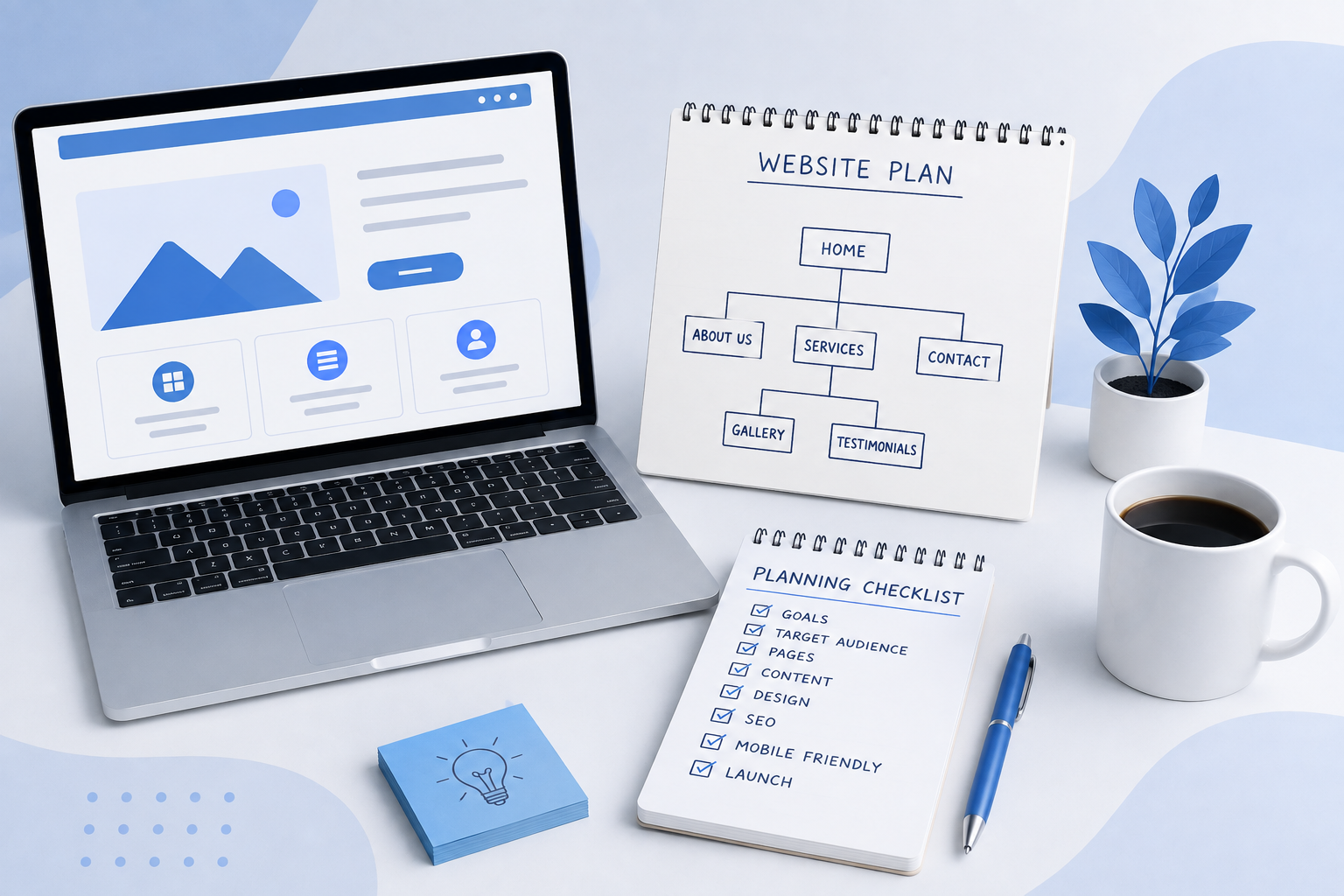
Once you understand your goal and audience, create a basic website structure.
A typical business website may include:
- Home
- About Us
- Services
- Products
- Portfolio or Gallery
- Testimonials
- FAQ
- Contact Us
You don't need every possible page. Choose pages based on what your customers actually need.
For example, a small service business might only need:
Home → About → Services → Contact
A larger business may need separate pages for each service, case studies, FAQs, and other resources.
C2D helps businesses plan a website structure that keeps important information easy to find.
Step 4: Plan Your Homepage
Your homepage is often the first major page visitors see, so it should quickly communicate what your business does.
A strong homepage can include:
Hero Section
A clear headline that immediately explains what your business offers.
About Section
A short introduction that helps visitors understand your business.
Services Section
A clear overview of your main products or services.
Why Choose Us
Reasons that help customers understand why they should choose your business.
Portfolio or Gallery
Visual examples of your products, services, or previous work.
Testimonials
Real customer feedback that can help build trust.
Call to Action
A clear next step such as Get a Quote, Contact Us, Book Now, or Chat on WhatsApp.
Step 5: Prepare Your Website Content
Don't wait until the website is almost finished before preparing your content.
Prepare important information such as:
- Business introduction
- About Us content
- Service descriptions
- Product information
- Testimonials
- Frequently asked questions
- Contact information
- Calls to action
Your content should be clear, useful, and easy to understand.
Good website content should answer the questions your customers are most likely to have.
At C2D, we recommend planning your content alongside your website structure so the design and information work together.
Step 6: Collect Your Images and Brand Materials
Visual content plays an important role in website design.
Before development begins, collect the materials you want to use:
- Logo
- Product photographs
- Service images
- Portfolio images
- Team photographs
- Business photographs
- Icons and graphics
Use high-quality images that genuinely represent your business.
A professional website should feel authentic to the business rather than relying entirely on unrelated stock images.
Step 7: Choose Your Domain Name
Your domain name is your website's online address.
For example:
yourbusiness.com
When choosing a domain, try to make it:
- Easy to remember
- Easy to spell
- Relevant to your brand
- Simple and professional
Your domain becomes part of your online identity, so choose it carefully.
Step 8: Choose the Right Hosting
Your website also needs hosting. Hosting stores your website's files and makes them accessible online.
When selecting hosting, consider:
- Website performance
- Reliability
- Security
- Storage
- Technical support
- Scalability
A simple business website may have different hosting requirements from an e-commerce website or a custom web application.
C2D can help businesses understand the technical requirements of their website before development begins.
Step 9: Decide Your Website Design Direction
Before development, decide how you want your website to look and feel.
Think about:
- Brand colors
- Fonts
- Button styles
- Navigation
- Image style
- Page layouts
- Spacing
- Overall visual style
Your website design should match your business identity.
For example, a luxury brand may prefer an elegant visual style, while a technology company may prefer a modern and minimal design.
At C2D, we focus on creating designs that combine professional appearance with a simple and useful user experience.
Step 10: Plan for Mobile Users
Don't plan your website only for desktop computers.
Your website should work properly on:
- Smartphones
- Tablets
- Laptops
- Desktop computers
Important elements such as menus, buttons, forms, images, and text should remain easy to use on smaller screens.
Mobile responsiveness should be part of your original website plan, not something added at the end.
Step 11: Plan Your SEO Strategy
SEO stands for Search Engine Optimization. It helps search engines understand your website and can help your pages appear for relevant searches.
SEO planning should begin before development.
Start by identifying:
- What your customers search for
- Your main services
- Relevant keywords
- Your target locations
- Common customer questions
For example, a business offering website services in Trichy may target relevant searches such as website development company in Trichy, website design company in Trichy, and business website development in Trichy.
Keywords should always be used naturally. The goal is to create useful content for people first and search engines second.
Step 12: Plan Your Calls to Action
Every important page should have a clear purpose.
Ask:
What should the visitor do after reading this page?
For example:
- Home → Contact Us
- Services → Get a Quote
- Portfolio → Enquire Now
- Product → Buy Now
- Blog → Explore Our Services
Clear calls to action create a better customer journey and make it easier for visitors to contact your business.
Step 13: Set Your Website Budget
Before development begins, decide what you are comfortable investing in your website.
Your website budget may depend on:
- Number of pages
- Design requirements
- Custom functionality
- E-commerce features
- Booking systems
- Content creation
- SEO
- Hosting
- Maintenance
Don't add features simply because they sound impressive. Choose features that actually support your business goals.
At C2D, we believe a website should be built according to what the business actually needs.
Website Planning Checklist
- Define your website goal
- Identify your target audience
- Plan your website pages
- Plan your homepage
- Prepare your content
- Collect your images and brand materials
- Choose your domain
- Choose your hosting
- Decide your design direction
- Plan for mobile users
- Research your SEO keywords
- Plan your calls to action
- Set your budget
Why Proper Website Planning Matters
Skipping the planning stage can create problems later.
Without a clear plan, you may end up with confusing navigation, missing information, unnecessary pages, poor mobile experience, weak SEO structure, or additional development costs.
A clear plan gives your website development process a strong foundation.
That's why C2D treats website planning as an important part of creating a professional business website.
What's Next?
Now that you've defined your goals, planned your pages, prepared your content, and created your website structure, you're ready for the next stage.
It's time to build the website.
In our next guide, we'll take the plan you've created and turn it into a professional, functional business website.
Next: How to Build a Professional Business Website Step by Step
Build Your Website With C2D
Planning your website doesn't have to be complicated.
At C2D (Concept to Deploy), we help businesses turn their ideas and requirements into professional websites designed around their customers and business goals.
Have a website idea? Start planning it with C2D.